 Contact Us
 (877) 248-1631
If you broach keyways, splines or serrations on a CNC lathe or mill, you know the routine: look up the spline, flip through charts to find a holder and insert that fit the bore, work out radial depth and clearances, write the program, then hold your breath on the first part. The CNC Broach Toolbox puts all of that in one free web app. Pick the tool, write the G-code, watch it cut in 3D, and send us the job for a quote, all from your browser with nothing to install and no account to make.
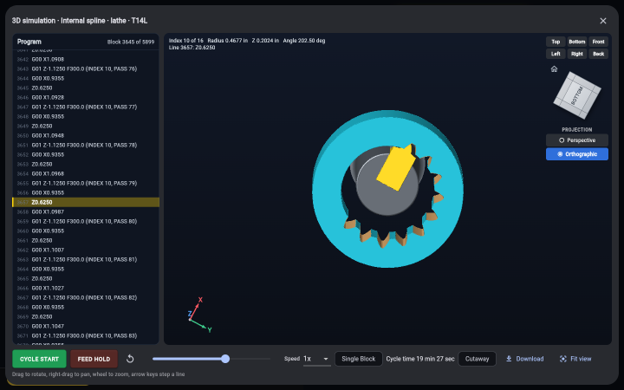
A 16-tooth internal spline, broached in the 3D simulation.
Here is what it does and where to find each part.
What’s inside
| I want to… | Go here |
| Find a holder and insert for a keyway | Keyway Tool Picker |
| Write a keyway broaching program | Keyway Program Generator |
| Calculate an involute spline and match a tool | Spline Calculator |
| Figure out what spline I have from measurements | Spline Identifier |
| Work out a serration | Serration Calculator |
| Look up an SAE straight-sided spline | SAE Spline Calculator |
| Write a spline or serration program | Spline Program Generator |
| Find a job I did before, or share one | History |
Every page has its own address, so you can bookmark the one you use most.
Keyways: the right tool, then the program
Start at the Keyway Tool Picker. Enter the keyway width, radial depth, bore and length of cut, and the Toolbox shows every holder and insert that fits. When a stock insert matches your width, you see it. When your keyway is narrower than the insert, the picker shows the special width grind it needs, so an odd size isn’t a dead end.
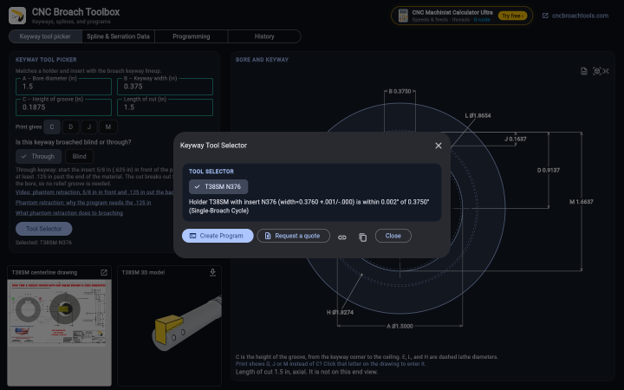
A 3/8 in keyway in a 1.5 in bore: the Tool Selector finds the T38SM holder with an N376 insert and shows the holder’s drawing and 3D model.
The fits are ranked by rigidity, not guesswork. Each holder gets a bar showing how much it will deflect in your cut: the shorter the bar, the stiffer the setup, and the stiffest holder sits on top as the recommendation. A stiffer holder means less chatter, better finish and longer insert life.
When you have your tool, one click sends it to the Keyway Program Generator with the tool already filled in. The generator writes the complete broach cycle with M19 spindle orientation and sensible defaults:
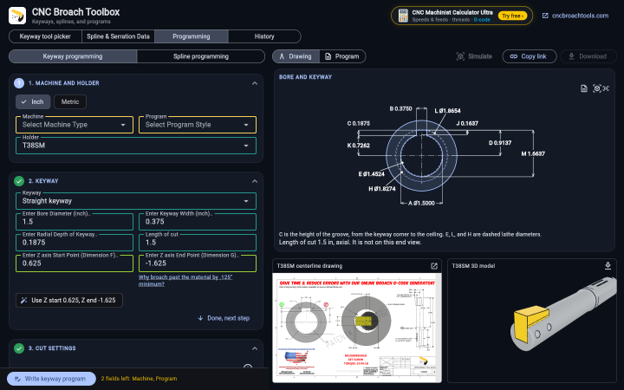
Create Program carries the holder, bore, keyway and Z points into the generator. Fields outlined in yellow-green were filled in for you.
- Z start at 0.625 in (15 mm) in front of the part, so the tool is clear of the phantom retraction.
- Z end at the length of cut plus 0.125 in (3 mm), so the insert fully clears the cut before it retracts.
- Centerline taken from the holder’s own dimension, with an option to start 0.002 in under it.
Required fields turn yellow until they’re filled and green when they’re good, so it’s easy to see what’s missing. Download the program and it’s ready for your control.
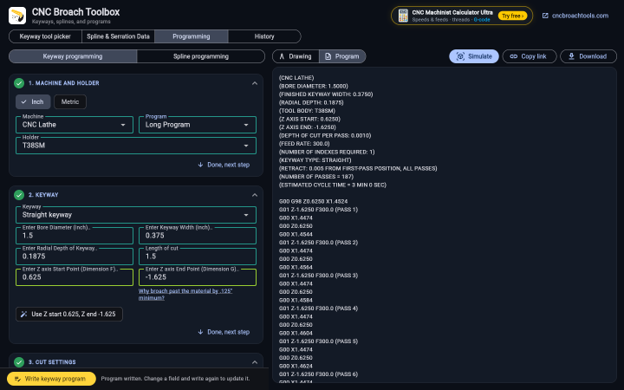
The written program starts with a header of the job’s details, then every pass.
Splines and serrations
The Spline Calculator works out the full data for an involute spline in ANSI B92.1, ANSI B92.2M, DIN 5480, DIN 5482, JIS B 1603 and ISO 4156, internal or external: pitch and base diameter, major and minor diameters, space width or tooth thickness, form diameter, and measurement between or over pins. For ANSI B92.1 splines it also matches broach tools, ranked by rigidity the same way keyways are.
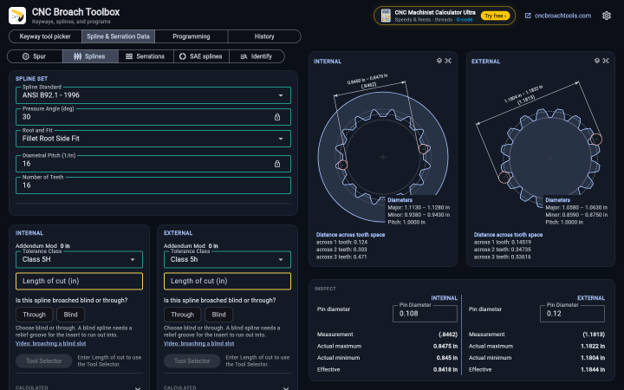
The Spline Calculator draws both members and gives the diameters, distance across tooth spaces and pin measurements.
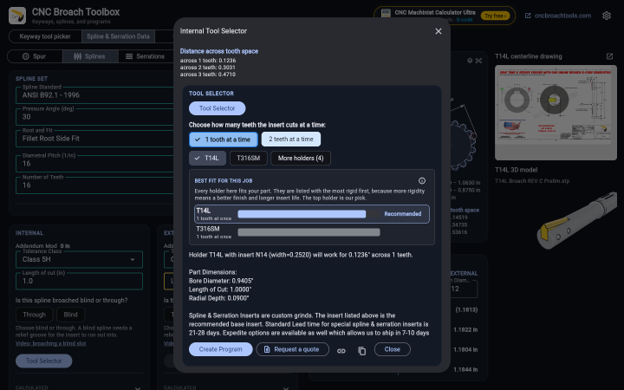
The Tool Selector lists every holder that fits. The shortest bar means the least deflection, so the top holder is the pick.
Not sure what spline you’re looking at? The Spline Identifier works backward. Enter the tooth count and what you can measure, and it lists the standard splines that match. It’s the quickest way to turn a worn part or an old drawing into a spline you can quote.
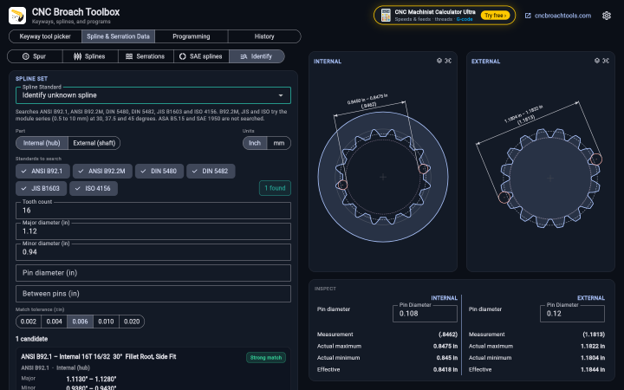
Enter the tooth count and two diameters, and the Spline Identifier finds the standard spline that matches.
For other forms, use the Serration Calculator and the SAE Spline Calculator. Both match tools and hand off to the Spline Program Generator, which writes the indexing program for every tooth space. Serrations can be cut several spaces at a time, with the program running two passes so the spaces skipped on the first pass are cut on the second.
Watch it cut before your machine does
Every program can be simulated in 3D right in the browser. The simulation runs the program you just wrote, line by line: the part in cyan, the insert in yellow and the broached surfaces in tan-orange as they’re cut. Turn the view with the cube or jump to the top, bottom, front, back, left or right view. It’s a fast way to catch a wrong depth, a short Z end or a bad index before it costs you a part.
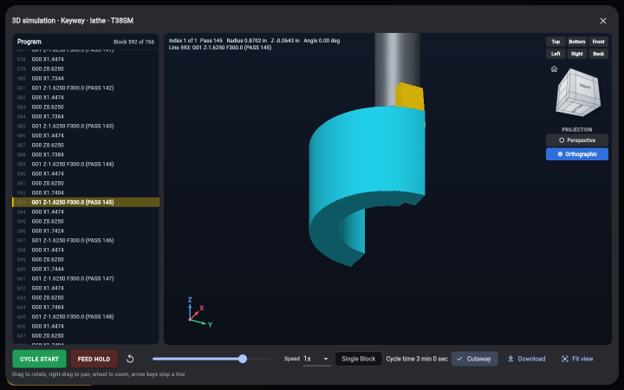
The keyway program running in the simulation, with the current line highlighted in the listing.
You can also open the holders in a 3D viewer and download them as DXF or STEP (.stp) files to drop straight into your CAD or CAM setup.
Your jobs, saved and shareable
The Toolbox remembers the programs you export and the tools you search for on the History page. History is kept in your own browser only. Nothing is stored on our servers.
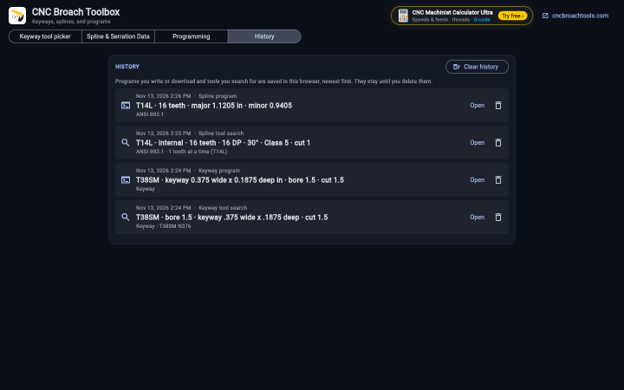
History keeps your programs and tool searches. Open any of them to pick up where you left off.
From any job you can:
- Copy the job data to the clipboard with one click. For splines it includes everything needed to make the part: the designation (for example A 50×45 DIN 5482), tooth count, pitch or module, diameters, pin measurement and length of cut.
- Make a share link that opens the same job for a coworker or for us.
- Request a quote. The request is filled in with the full job data, so we have what we need the first time.
Get started
Open the CNC Broach Toolbox on a desktop or laptop browser. It’s built for a full screen, so phones get a short note asking for a bigger one.
- Cutting a keyway? Start with the Keyway Tool Picker.
- Cutting a spline? Start with the Spline Calculator, or the Spline Identifier if you don’t know the spec.
- Send the tool to the Keyway or Spline Program Generator, simulate it, and download the program.
Have a job that doesn’t fit the standard tools? Copy the job data from the Toolbox and send it to us. We’ll help you find the right setup.
